

The best tablets for kitchen recipes are the Samsung Galaxy Tab S10 FE for splash-prone kitchens, the standard iPad (A16) for the best all-round recipe experience, and the iPad mini (A17 Pro) when counter space matters most.
Our top picks
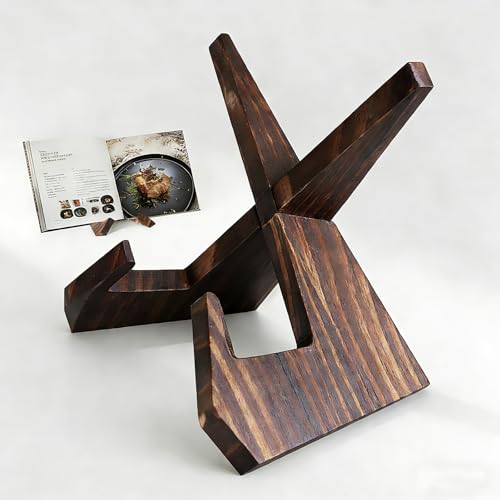 Aloimiki Wooden Cookbook Stand
- Hands-Free Cooking:Keeps recipe books and tablets upright at…
- Fold Flat for Easy Storage: The lightweight folding…
- Natural Carbonized Pine Wood: Crafted from solid pine…
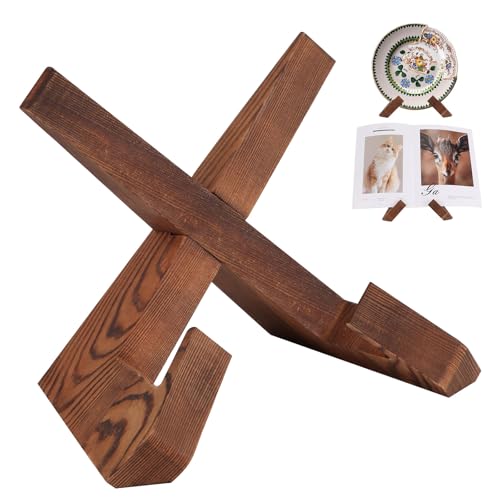 Justore Wooden Cookbook Stand for Kitchen
- Perfect Size & Adjustable Design: Holds hardcover cookbooks…
- Premium Solid Wood Construction: Crafted from smooth, carbonized…
- Rustic Farmhouse Aesthetic: Distressed finishes and warm brown…
| Product | Key specs | |
|---|---|---|
| Aloimiki Wooden Cookbook Stand | Hands-Free Cooking:Keeps recipe books and tablets upright at… Fold Flat for Easy Storage: The lightweight folding… Natural Carbonized Pine Wood: Crafted from solid pine… | Check price |
 Recipe Book to Write in Your Own Recipe Book to Write in Your Own | 1 2 3 | Check price |
| Justore Wooden Cookbook Stand for Kitchen | Perfect Size & Adjustable Design: Holds hardcover cookbooks… Premium Solid Wood Construction: Crafted from smooth, carbonized… Rustic Farmhouse Aesthetic: Distressed finishes and warm brown… | Check price |
 Kitchen Recipe Display for Fire Tablet Cooking Kitchen Recipe Display for Fire Tablet Cooking | 1 2 3 | Check price |
As an Amazon Associate we earn from qualifying purchases at no extra cost to you.
Quick comparison: the best recipe tablets in 2026
| Tablet | Screen and visibility | Weight | Battery | Water resistance | Typical price range |
|---|---|---|---|---|---|
| Samsung Galaxy Tab S10 FE | 10.9-inch LCD, 2304 × 1440, up to 90Hz | 497g | 8,000mAh; up to about 20 hours video playback claimed | IP68 | About $450–$650 |
| iPad (A16) | 10.86-inch LCD, 2360 × 1640 | 477g | About 28.6Wh; up to 10 hours web or video use claimed | None | About $350–$500 |
| iPad mini (A17 Pro) | 8.3-inch LCD, 2266 × 1488 | 293g | About 19.3Wh; up to 10 hours web or video use claimed | None | About $500–$700 |
Battery figures are manufacturer estimates under controlled conditions, not a promise of continuous cooking time. Brightness, video playback, Wi-Fi strength, Bluetooth accessories, and frequent screen interaction can reduce runtime. Storage and cellular versions also affect pricing.
Best overall: iPad (A16)
The standard iPad is the easiest recommendation for most home cooks. Its 10.86-inch screen provides enough room for ingredient lists, timers, photos, and video controls without taking over a normal countertop. iPadOS also has a mature selection of recipe, grocery-list, note-taking, streaming, and smart-home apps.
Its 2360 × 1640 resolution produces sharp text, while the 477g weight is manageable on a stand. The main compromise is durability: it has no IP water-resistance rating. A splash, flour dust, oil mist, or wet hand is not automatically catastrophic, but the tablet should be kept away from the sink and wiped rather than rinsed.
Choose at least 128GB if you download cooking videos, save large recipe collections, or use the tablet for general entertainment. A 64GB model can work for browser-based recipes and light app use, but storage becomes restrictive sooner.
Why it works for recipe apps
- Strong app availability for iPadOS, including split-screen notes and recipe viewing.
- Responsive touch controls for scrolling, timers, and checklist-style ingredients.
- Large enough for video instruction while remaining reasonably portable.
- USB-C charging and broad accessory support.
The built-in speakers are adequate for a quiet or medium-sized kitchen, but they are not a substitute for a dedicated Bluetooth speaker when water is boiling, an extractor fan is running, or several people need to hear instructions.
Best for spills and outdoor cooking: Samsung Galaxy Tab S10 FE
The Galaxy Tab S10 FE is the strongest choice when water resistance is more important than having the largest iPadOS app ecosystem. Its IP68 rating is designed for dust protection and immersion under specified test conditions, which gives it a meaningful advantage around sinks, wet countertops, and outdoor prep areas.
Do not interpret IP68 as permission to cook with the tablet under running water. Salt, grease, acidic ingredients, hot steam, and repeated exposure can still damage ports, seals, finishes, or accessories. Close the charging port cover when applicable, keep the tablet unplugged near water, and follow Samsung’s cleaning guidance.
The 10.9-inch 2304 × 1440 display is close in working size to the iPad’s screen. Its 90Hz refresh rate can make scrolling feel smoother, although brightness and reflections matter more than refresh rate when reading a recipe under overhead lights. The supplied or compatible S Pen support can also be useful for annotating recipes without repeatedly touching the display with messy fingers.
Its larger 8,000mAh battery is particularly useful for long cooking sessions, recipe videos, or leaving a recipe visible throughout the day. Android also makes it simple to use split-screen layouts, such as a recipe beside a shopping list or conversion calculator.
Best for small counters: iPad mini (A17 Pro)
The iPad mini is the best fit for a cramped galley kitchen, a narrow apartment counter, or a cook who wants to carry recipes between the kitchen, garden, and dining room. At 293g, it is much easier to reposition than a 10- or 11-inch tablet, and its 8.3-inch display is still considerably more comfortable for recipes than a phone.
Its limitation is legibility at a distance. A recipe with a long ingredient list may require more scrolling, and video controls leave less room around the picture. If the tablet will sit more than about 60–75cm away, a larger model is generally easier to read without leaning forward or increasing text size.
The mini has no water-resistance rating, so it needs the same splash precautions as the standard iPad. Its smaller battery capacity does not necessarily mean poor endurance, but a high screen brightness setting and continuous video can make recharging more frequent than on the Galaxy Tab S10 FE.
Head-to-head buying decisions
If you cook every day
Choose the Samsung Galaxy Tab S10 FE if spills are common, or the iPad (A16) if app selection and polished recipe software are your priority. Daily cooks benefit more from easy cleaning, a stable stand, and a bright display than from maximum processor performance.
If you mainly follow video recipes
Pick a 10.9- or 10.86-inch model. The iPad (A16) and Galaxy Tab S10 FE show more of a video and its controls at once than the iPad mini. The Samsung’s larger battery can be helpful when the tablet is also used for music or long streaming sessions.
If counter space is limited
Choose the iPad mini, but budget for a stand that raises it to eye level. A tablet lying flat beside a chopping board takes up valuable prep space and is more likely to collect spills. The mini’s small footprint is most useful when its stand is placed at the back of the counter.
If you are buying on a budget
The standard iPad usually offers the best balance of price, screen size, performance, and accessory availability. Look for a previous-generation model only when its software support, battery condition, and storage meet your needs. A low purchase price is less attractive if a worn battery requires replacement or the tablet cannot run your preferred recipe app.
Screen visibility matters more than resolution
All three tablets have sufficiently sharp displays for recipe text. In practice, readability depends on brightness, reflections, font size, viewing angle, and distance. Glossy screens can reflect pendant lights and windows, while flour-covered fingertips can make frequent swiping unpleasant.
- Place the screen perpendicular to the strongest light source rather than directly beneath it.
- Increase text size before increasing brightness to maximum.
- Use dark text on a light background for printed-style recipes in a bright room.
- Keep the tablet on a stand rather than flat on the work surface.
A matte screen protector can reduce reflections, but inexpensive protectors may soften text or reduce touch sensitivity. Test the protector with wet and dry fingers before permanently installing it.
Countertop fit: a simple sizing check
Measure the intended area, including the footprint of the stand, not just the tablet. A 10.9-inch tablet may be roughly 25cm wide, but a folding stand can add several centimetres behind it and require extra space for a charging cable. Leave at least 5cm between the stand and the edge of the counter so a bumped tablet is less likely to fall.
For a 60cm-deep counter, placing a 10- or 11-inch tablet on a stand at the rear usually leaves more usable chopping space than laying it flat. On a narrow 35–40cm counter, the iPad mini is easier to position without forcing ingredients, bowls, and utensils into a crowded area.
Durability, cleaning, and ownership costs
The first parts likely to suffer in a kitchen are charging ports, screen coatings, buttons, and stand hinges—not the processor. Crumbs can enter ports, oil can build up around cases, and repeatedly bending a cheap folio cover can loosen its magnets or stitching.
- Wash and dry your hands before connecting a charging cable.
- Unplug the tablet before cleaning it.
- Use a soft, lint-free cloth lightly dampened according to the manufacturer’s instructions; do not spray cleaner directly onto the display.
- Use a washable case or bumper with raised edges, but avoid cases that block microphones or speakers.
- Never charge a tablet while its port or cable is wet.
- Keep the device away from hot pans and ovens; water resistance does not protect against heat.
For frequent cooking, a case and stand are part of the real cost. A roughly $25–$60 protective case, a $15–$40 adjustable stand, and a screen protector can add $40–$100 to the purchase. That expense is usually more useful than paying extra for cellular connectivity if recipes are viewed at home over Wi-Fi.
Final recommendation
Buy the Samsung Galaxy Tab S10 FE for the safest everyday choice around splashes and the longest claimed battery endurance. Buy the iPad (A16) for the best general-purpose recipe tablet and the broadest polished app experience. Buy the iPad mini (A17 Pro) when portability and countertop space outweigh the convenience of a larger screen.






Write Your Review
No reviews yet. Be the first to share your experience!